
The useful question is not whether Gemini Omni 1.2 Flash can make a good-looking clip. It is whether the model's route, input contract, output quality and billing unit fit the job you need to ship. Omni 1.2 Flash is interesting because it brings generation, editing, extension and upscaling into one model family, while keeping a short-video workflow and native audio in view.
Source review: November 6, 2026. This guide combines the Google launch announcement, Google Cloud's GA post, the Google Cloud model documentation, the EvoLink model page, and third-party articles from Segmind, Kingy AI and Shattered. Google documentation is the primary source for model facts. EvoLink and Segmind describe their own routes, prices and tests; none of those pages proves that ToAPIs currently exposes the model.
1. What Gemini Omni 1.2 Flash adds
Google Cloud lists gemini-omni-1.2-flash as a generally available multimodal model designed for video, image and text tasks. The documented capability matrix includes text-to-video, image-to-video, reference-to-video, first-and-last-frame video, video editing, video extension and video upscaling. It also lists thinking, but not system instructions, structured output, function calling or the Gemini Live API for this model.
The model page documents video output from 3 to 15 seconds for generation and editing, 3 to 10 seconds for first-and-last-frame generation, and 3 to 10 seconds of appended duration for extension. Supported aspect ratios are 16:9 and 9:16; documented output resolutions are 360p, 720p, 1080p and 4k. Input video limits depend on the operation: editing and upscaling accept up to 15 seconds, while extension uses the end of a longer source under its own contract.
| Capability | What the primary documentation says | Integration question |
|---|---|---|
| Text to video | Prompt-driven video, 3–15 seconds | Which resolution and audio fields does the chosen provider expose? |
| Image or reference to video | Image and video references, with route-specific limits | Do image order and reference names have semantic meaning? |
| First and last frame | Supported, with 3–10-second output | Is the second image an end frame or another reference? |
| Video edit | Edit a source video up to 15 seconds | Does duration and aspect ratio follow the source? |
| Video extend | Add 3–10 seconds under an extension contract | Is duration the appended length or total output length? |
| Video upscale | Upscale supported source resolutions up to 4K | Is this enhancement priced separately from generation? |
The launch announcements emphasize five practical improvements over the previous generation: 15-second clips, a lower published 720p price, stronger adherence to image and video references, draft generation at lower resolution followed by 1080p or 4K upscaling, and more natural dialogue with clearer lip sync and multiple-speaker conditions. Google also describes conversational editing, such as changing a product, lighting or camera angle without restarting from scratch.
Those are product-level claims, not a promise that every provider exposes every control. A provider may split one model family into separate slugs, omit a capability or add a different billing layer. Always treat the exact route schema as the integration contract.
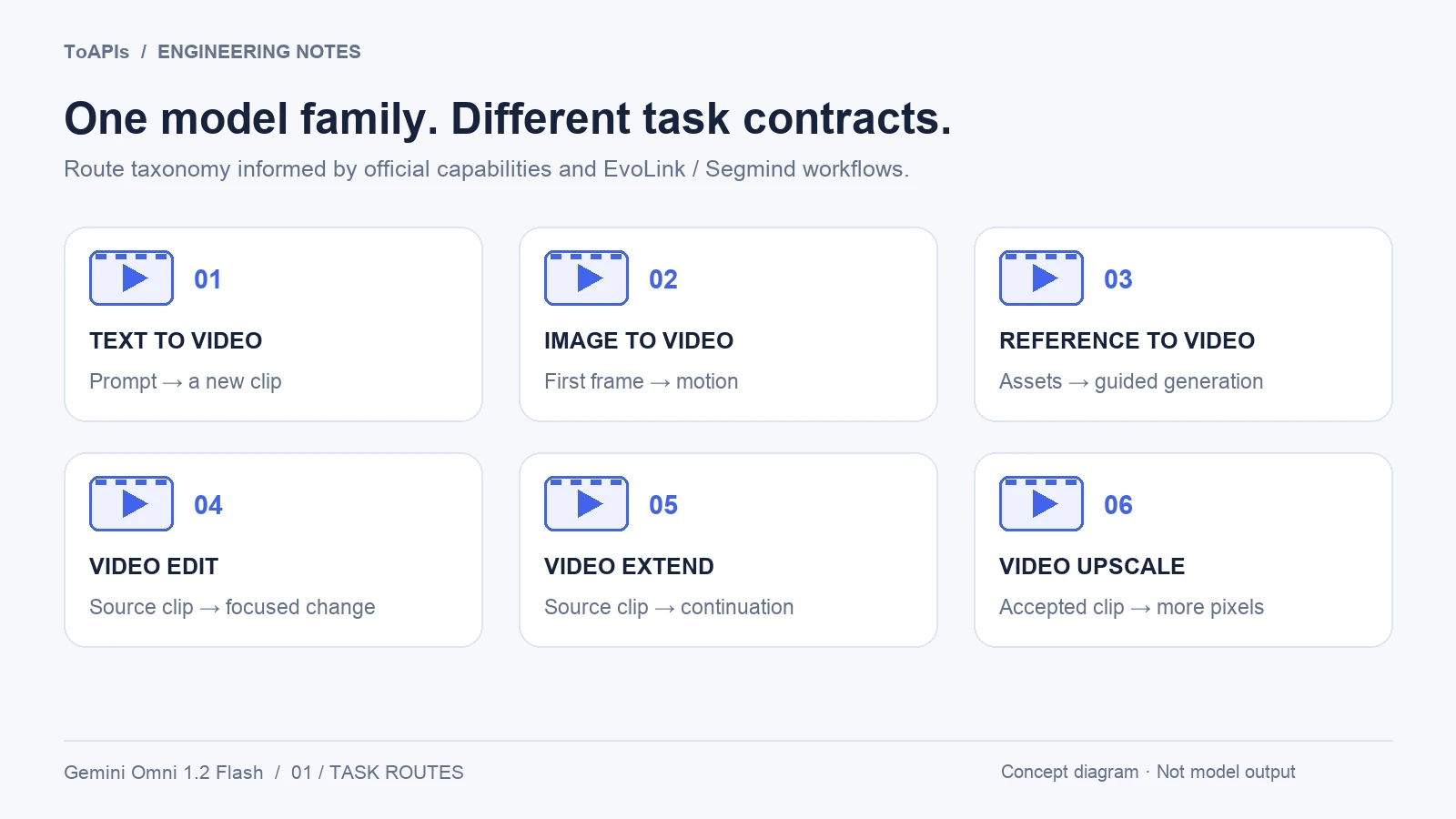
Original task-map illustration based on the official capability list and third-party route descriptions. Actual endpoints vary by provider; this is not model output.
2. Six routes, six different contracts
The EvoLink page presents six task routes on one asynchronous video interface: text-to-video, image-to-video, reference-to-video, video edit, video extend and video upscale. Its model IDs are useful for understanding route planning, but they are EvoLink identifiers rather than confirmed ToAPIs identifiers.
Segmind's review provides a second route-oriented view and explicitly reports that its refine route was not available in its launch tests. That is a good example of why an attractive capability list should not be copied into a product form without a live schema check.
| Route | Typical input | Main boundary to validate |
|---|---|---|
| Text to video | Prompt | 3–15 seconds; resolution, ratio, audio and seed may be provider-specific |
| Image to video | First image and prompt | A second image may define an end frame; confirm the maximum duration |
| Reference to video | Reference images or videos plus prompt | Count, duration and reference naming rules differ |
| Video edit | Source video plus one focused change | Source length, safety filters and whether output follows source framing |
| Video extend | Existing video plus continuation prompt | Added duration is not necessarily total duration |
| Video upscale | Existing video, usually no prompt | Accepted source sizes, output tiers and separate billing |
A route selector should change its validation rules, help text and cost preview together. Do not let a generic duration field silently carry the semantics of an extension route into a generation route. Do not assume a field named image_urls means the same thing in image-to-video and reference-to-video requests.
Do not merge Google Cloud and Gemini API limits
The Gemini API guide documents up to six reference images, while the Google Cloud model page lists up to ten images per prompt. Gemini API also applies video-reference limits that depend on the requested duration: a longer 11–15-second generation supports one short reference video, not the same reference budget as a 3–10-second job. These are separate platform contracts, not contradictory values to average or combine.
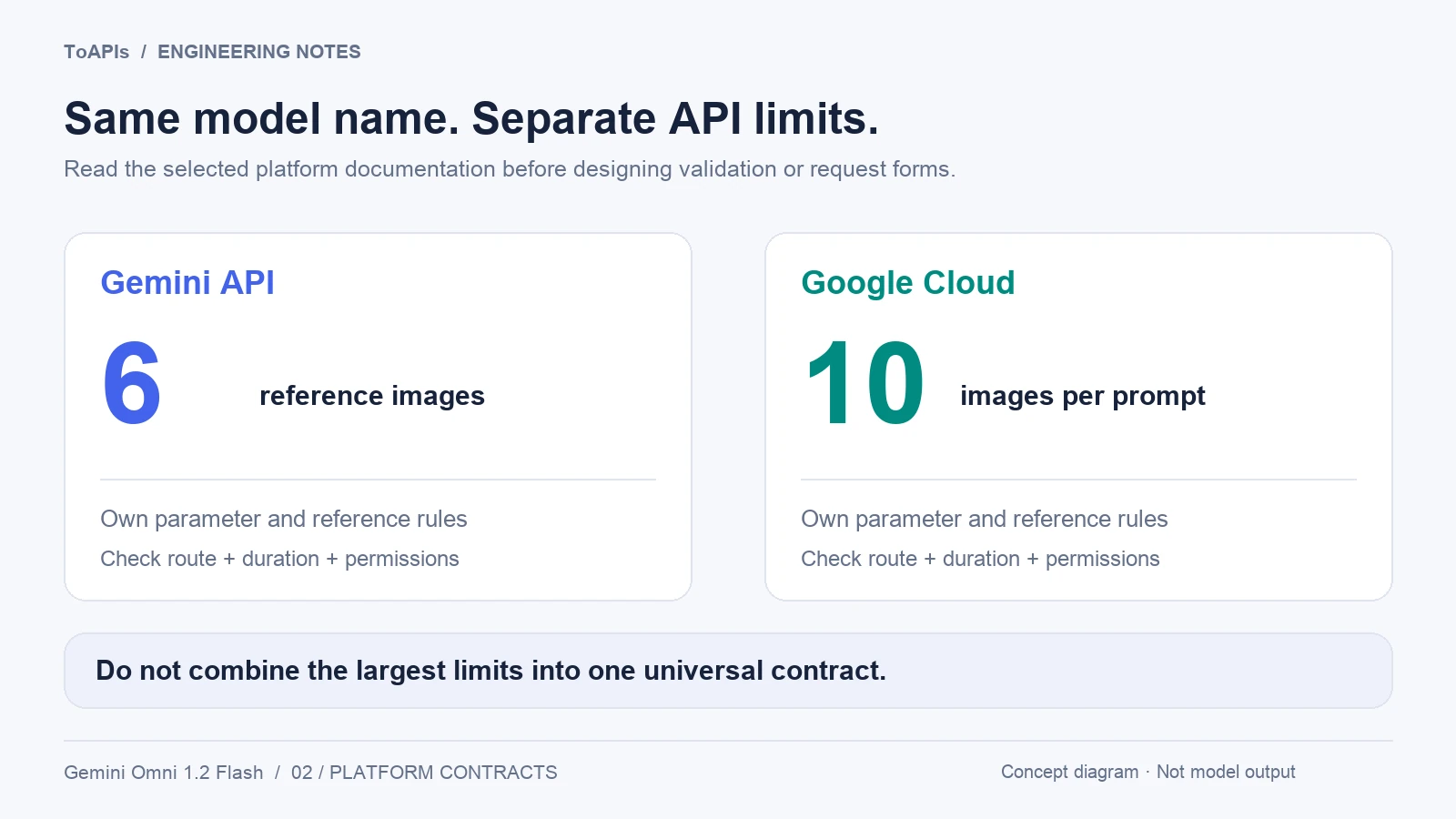
Separate platform contracts: six reference images in Gemini API versus ten images per prompt in Cloud documentation. These maxima cannot be combined; verify the selected route and duration.
For the Gemini API, the documented integration uses the Interactions API, not generate_content, an OpenAI chat-completions call or a Veo-specific generate_videos method. The following is an adapted, paid-call example, not a ToAPIs request. It requires a current google-genai SDK, an eligible account and a key configured locally; never put credentials in a prompt or browser bundle. It was not executed for this article.
import base64
from pathlib import Path
from google import genai

client = genai.Client()
interaction = client.interactions.create(
    model="gemini-omni-1.2-flash",
    input=(
        "A blue ceramic cup on a neutral table. "
        "One continuous slow camera push-in. "
        "Soft room ambience, no speech, no text."
    ),
    response_format={
        "type": "video",
        "resolution": "360p",
        "duration": "5s",
        "aspect_ratio": "16:9",
    },
)
Path("omni-draft.mp4").write_bytes(
    base64.b64decode(interaction.output_video.data)
)
print("interaction ID:", interaction.id)
In this API, duration is a string such as "5s", not an integer copied from a gateway form; generation controls live under response_format. For larger files, the guide documents URI delivery and file-readiness handling. Multi-turn edits use previous_interaction_id; setting store=false removes the stored state needed for that follow-up workflow. Review these trade-offs rather than blindly copying latency settings.
3. Resolution strategy: draft first, upscale selectively
The Gemini API guide explicitly identifies 360p and 720p as generation tiers and 1080p and 4K as upscaled output. A 4K delivery option therefore does not establish native 4K generation. The most practical workflow in the launch material is to separate exploration from delivery. Use 360p or 720p for prompt iteration and composition checks. Once a clip passes the acceptance checklist, either render it directly at a higher resolution or send the chosen source through the documented upscale route.
This strategy reduces wasted high-resolution generations, but it introduces a second operation to measure. An upscaler can add detail without changing the underlying motion or fixing a bad composition. It cannot guarantee that a wrong label, unstable face or incorrect object movement becomes correct at 4K.
Keep the source resolution, output resolution, route, duration and token usage in the job record. Compare native high-resolution output with upscaled output using the same source, crop and acceptance criteria. A third-party review from Segmind reported useful detail from upscaling but also treated it as a costed workflow step, not a free substitute for every native render.
For production, define two gates:
- A creative gate: subject identity, composition, motion, text, dialogue and sound meet the brief.
- A delivery gate: dimensions, duration, codec, audio track, rights and file retention meet the downstream requirement.
Only clips that pass both gates should enter the final asset library.
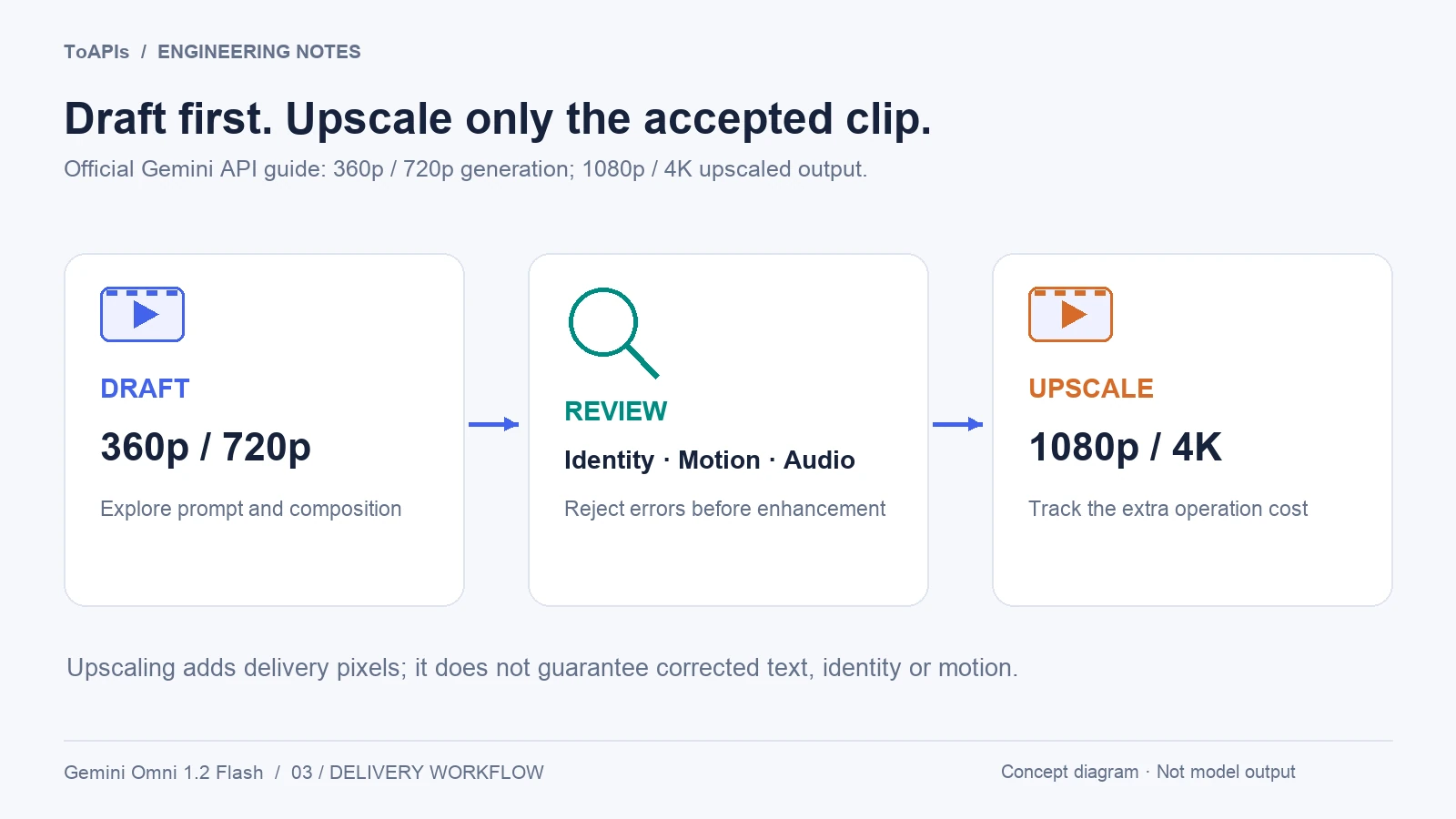
Concept workflow based on the Gemini API guide. Higher-resolution delivery uses upscaling; it does not guarantee corrected motion, text or identity.
4. Prompting for instruction-exact video
Third-party tests are especially valuable for prompt design when they reveal what to check, not when they become universal benchmark claims. Segmind reports strong results for labelled explainers, kinetic typography, chart animation from a supplied final frame, stylized motion graphics and single-change edits to real footage. The same review reports weaker results for photoreal people from scratch, data plotting from numbers alone, and some multi-step or brand-logo edits.
A robust Omni prompt should separate:
- the subject and its visible identity;
- the ordered beats of the scene;
- camera movement and what must stay locked;
- exact on-screen text, quoted separately;
- dialogue, music and sound effects;
- the final state, preferably pinned with a last-frame input when the route supports it;
- one change to preserve for an edit, plus everything that must remain unchanged.
For example:
Create a flat 2D motion-graphics explainer in 16:9.
Show the title 'HOW A PRODUCT VIDEO API WORKS' exactly as written.
First show one product photo, then three labelled route cards from left to right,
then connect the cards to one finished video frame.
Keep every label fixed after it appears. Use a locked-off camera.
Add a short, calm voiceover and a soft click for each route card.
End on the complete diagram. Do not add any other text or logos.
This brief is a proposed test, not a measured Omni output. The acceptance rules are more useful than adjectives such as “cinematic” or “viral”: every label must match, the order must be correct, the camera must remain locked and the audio must contain only the requested cues.
5. Native audio, references and editing
The official documentation lists speech, music and sound effects as supported, while Google's launch post highlights more natural dialogue, clearer lip sync and distinct multi-speaker conditions. The Google Cloud announcement also notes that audio references are gated behind allowlisting. That means audio needs its own capability and permission check, not just a checkbox in a generic video form.
Reference consistency is one of the model's headline themes. Google describes stronger adherence to image and video references, and the official model page supports reference-based generation. Yet reference support is not an identity warranty. Review face, clothing, product silhouette, visible marks, lighting and motion across the entire clip.
Conversational editing is also a workflow concept, not necessarily a single universal endpoint. The launch material describes changing a product, lighting or camera angle in the same clip. A provider may implement that as video edit, an interaction ID, a previous task reference or a different request body. Confirm the contract before storing assumptions in your database.
For each edit, record:
- the source video and its rights;
- the exact one-change instruction;
- what must remain unchanged;
- the route and model ID;
- the returned task or interaction ID;
- audio and safety-review results.
This makes a failed edit diagnosable and makes a successful edit reproducible enough for review.
6. Token pricing is not the same as a ToAPIs quote
Google's launch materials publish a vendor price for 720p video and describe a reduction from the previous model. The EvoLink page presents its own token-based calculator, discounts and route-specific prices. Kingy AI derives a 720p per-second estimate from token assumptions, while Shattered frames the launch around a published per-second price. These numbers are not interchangeable.
The Gemini API Standard pricing table, reviewed November 6, 2026, lists USD 1.50 per million input tokens for text, images and video; USD 9.00 per million text output tokens including thinking; and USD 12.00 per million video output tokens. It does not offer a free tier for this model. These are vendor list prices for that platform, not a ToAPIs quote.
The same pricing page lists 5,792 video output tokens per second at 720p. Therefore a 15-second 720p clip has an illustrative video-output component of 15 × 5,792 × 12 / 1,000,000 = USD 1.04256, before input and text/thinking output charges. This explains the rounded launch headline of about USD 0.07 per second without turning it into a fixed all-in fee. Prices, token rules and gateway markups can change.
A production cost model should identify:
| Cost dimension | What to preserve |
|---|---|
| Vendor or gateway | The exact provider, model ID and date |
| Billing unit | Seconds, video output tokens, input tokens, thinking tokens or a bundle |
| Resolution multiplier | Native output versus an upscale operation |
| Input media | Images, source videos and their billed token rules |
| Retry and rejection policy | Whether safety, validation or transport failures are charged |
| Acceptance yield | Attempts divided by clips that pass the delivery checklist |
For a hypothetical token plan, write the formula rather than copying a competitor's quote:
raw generation cost = input tokens × input rate
                    + video output tokens × video rate
                    + thinking tokens × thinking rate
workflow cost = raw generation cost
              + accepted retries
              + storage, transfer and review time
cost per accepted clip = workflow cost / accepted clips
Do not publish a ToAPIs price until its current catalog or quote endpoint confirms the model, SKU, unit and account-specific rate. Do not claim that a third-party measured latency or cost applies to a different gateway.
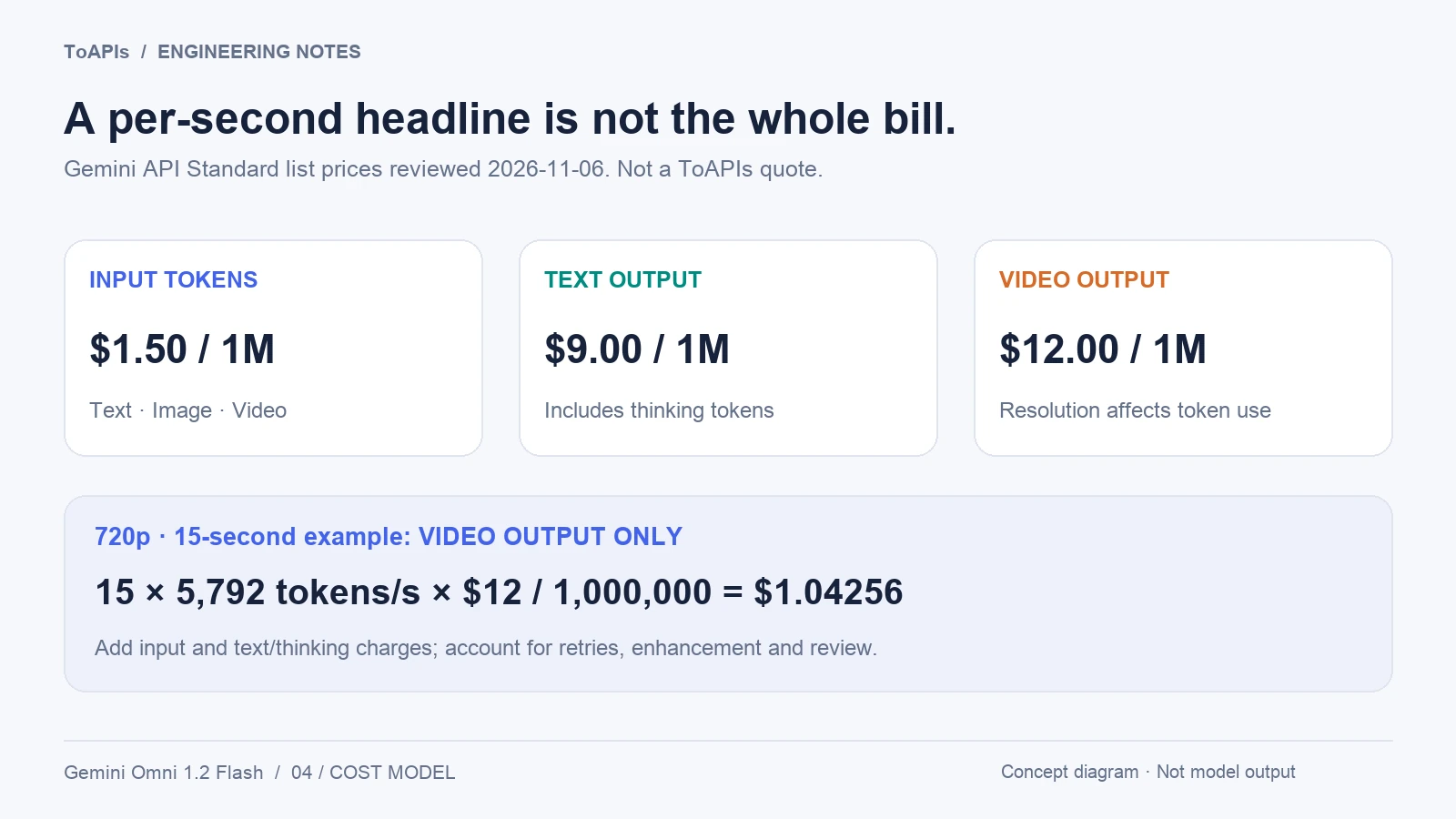
Vendor list-price illustration reviewed November 6, 2026, not a ToAPIs quote. USD 1.04256 covers only video output in this example; input and text/thinking charges are additional.
7. Build an acceptance pack before production
Before enabling this model in an application, run a small, repeatable pack:
- Text-to-video: a labelled explainer with ordered beats and explicit audio cues.
- Image-to-video: a product first frame with a required final state.
- Reference-to-video: one subject across several views, with a continuity checklist.
- Video edit: one change to a real clip while preserving the performance.
- Video extend: a shot whose camera direction and sound should continue naturally.
- Upscale: the same accepted draft compared with a native high-resolution render.
For each test, record model ID, route, inputs, prompt, seed if supported, resolution, duration, task ID, queue time, processing time, output token or billing data, audio result and acceptance verdict. Keep failures instead of selecting only the best examples.
Use third-party reviews as hypotheses. For example, Segmind's 20-test review is valuable because it names both strengths and failures, but its billed prices, latency and provider behavior belong to Segmind's environment. It is not an independent benchmark of every Gemini Omni 1.2 Flash integration.
8. Availability and integration checklist
The official Google model ID is gemini-omni-1.2-flash, but a model ID alone does not mean that a gateway has enabled it. Before integrating through ToAPIs, inspect the model catalog, current pricing and request documentation. Confirm the exact route, account entitlement, request body, asynchronous status model, result retention period and billing policy.
If the route is absent or the quote is unavailable, keep the feature disabled or label it as coming soon. Do not silently map a different Gemini model to the same marketing name. Do not report a live generation unless an authenticated call succeeded and the returned media was reviewed.
Sources and update policy
- Google: Gemini Omni 1.2 Flash: 15-second video and lower pricing — official launch announcement, November 5, 2026.
- Google Cloud: Gemini Omni 1.2 Flash now GA — general availability, enterprise context and launch claims.
- Google Cloud model documentation — model ID, capabilities, limits and release state.
- Gemini API Omni guide — Interactions API, platform-specific references, upscaled resolution tiers and editing state.
- Gemini API pricing — Standard token rates and video token conversion; a vendor price, not a ToAPIs quote.
- EvoLink Gemini Omni 1.2 Flash API page — gateway routes, calculator and provider-specific pricing presentation.
- Segmind: Gemini Omni 1.2 Flash tested — third-party tests, route observations, prompting and billed workflow context.
- Kingy AI: Specs, Benchmarks, Pricing and Availability — secondary specification and pricing overview; not an independent 1.2 benchmark.
- Shattered: Gemini Omni 1.2 Flash GA — secondary launch and cost overview; predictions are not treated as facts.
When updating this guide, record the provider, model ID, source URL and review date for every changed capability or price. Keep vendor prices, gateway quotes and third-party tests separate. This guide does not claim ToAPIs availability, an authenticated generation, a universal benchmark or a guaranteed production result.