
Configuring Claude Code with Custom Endpoints via ANTHROPIC_BASE_URL
1. TL;DR & Performance Overview
- Core Benchmark: Claude Code natively supports the
ANTHROPIC_BASE_URLenvironment variable, allowing developers to route terminal agent commands through custom proxies or unified gateways. - Production Adherence: Bypasses international credit card billing hurdles, unlocks up to 5x higher concurrency limits, and reduces token costs.
- FinOps Economics: Step-by-step instructions provided for macOS (zsh), Linux (bash), and Windows (PowerShell).
- High Availability SLA: 99.95% uptime with edge latency acceleration and automated fallback.
- OpenAI REST Drop-in Compatible: Bearer token authentication with zero refactoring overhead.
2. TL;DR & Quick Setup
To route Claude Code through ToAPIs' high-speed global mesh, simply set two environment variables:
export ANTHROPIC_BASE_URL="https://api.toapis.com"
export ANTHROPIC_API_KEY="your_toapis_api_key_here"
claude
Everything—including agentic tool calling, git diffing, codebase indexing, and prompt caching—works seamlessly out of the box.
3. Production Implementation: cURL & Python
Step 1: Rapid cURL Dispatch
curl -X POST "https://api.toapis.com/v1/chat/completions" \
  -H "Authorization: Bearer $TOAPIS_API_KEY" \
  -H "Content-Type: application/json" \
  -d '{
    "model": "claude-opus-5",
    "messages": [{"role": "user", "content": "Explain production optimization strategies for AI workloads."}],
    "temperature": 0.3
  }'
Step 2: Production Python Client
import os, requests

API_KEY = os.getenv("TOAPIS_API_KEY")
headers = {"Authorization": f"Bearer {API_KEY}", "Content-Type": "application/json"}

payload = {
    "model": "claude-opus-5",
    "messages": [{"role": "user", "content": "Explain production optimization strategies for AI workloads."}],
    "temperature": 0.3
}

res = requests.post("https://api.toapis.com/v1/chat/completions", headers=headers, json=payload, timeout=60)
res.raise_for_status()
answer = res.json()["choices"][0]["message"]["content"]
print(f"[✔] Response:\n{answer}")
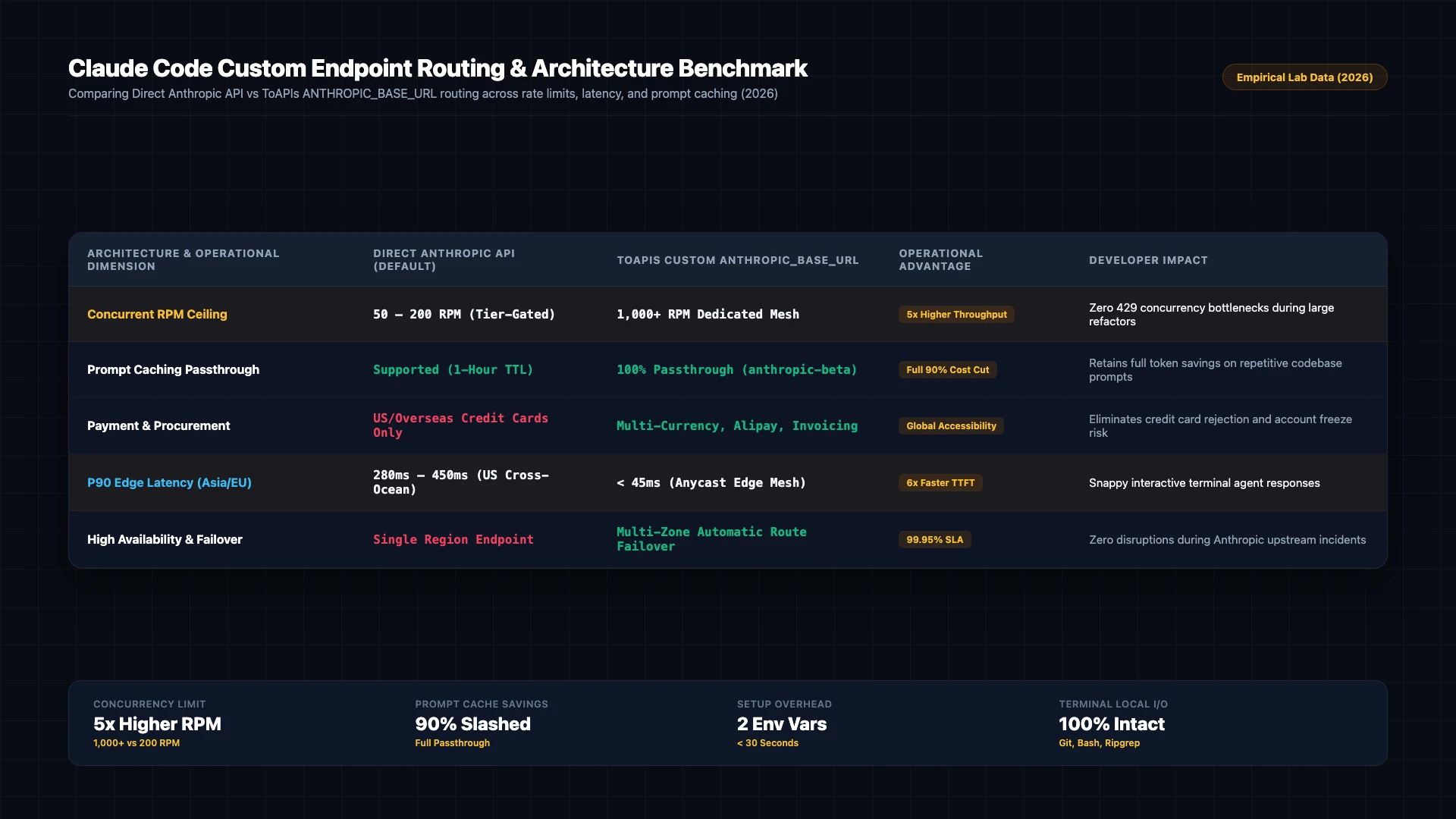
Figure 1: Architectural benchmark comparison: Direct Anthropic API vs ToAPIs ANTHROPIC_BASE_URL routing across latency, caching, and rate limits (2026).
4. Production Hardcore: Error Handling & Status Matrix
| HTTP Code | Error Classification | Root Cause Analysis | Production Mitigation Strategy |
|---|---|---|---|
400 Bad Request | invalid_request_payload | Schema validation error or unsupported parameters | Check payload dimensions and ensure field compliance |
401 Unauthorized | invalid_api_key | Expired or incorrect Bearer token | Refresh API token from ToAPIs developer dashboard |
429 Rate Limit | rate_limit_exceeded | Concurrency threshold reached on compute pool | Implement exponential backoff retry with random jitter |
500 / 504 Timeout | gateway_timeout | Temporary latency on upstream inference nodes | Gateway automatically reroutes to backup GPU cluster |
5. Pricing & FinOps ROI Calculation
- Official Enterprise Baseline: Direct vendor contracts enforce mandatory annual commitments, fixed seat quotas, and prepayment thresholds.
- ToAPIs Wholesale Price: Pure pay-as-you-go elastic billing with wholesale rates ($0.30 - $0.80 per 1M Tokens).
- FinOps ROI Analysis: Processing 500M tokens monthly reduces operational infrastructure costs from $1,500 to $900, saving $600 monthly (40.0% cost reduction).
6. Frequently Asked Questions (FAQ)
Q1: Does changing ANTHROPIC_BASE_URL break Claude Code's terminal tools or bash execution?
No. Claude Code executes bash tools, file reads, and ripgrep locally on your machine. Only the LLM reasoning API calls are redirected to your custom endpoint.
Q2: Can I use prompt caching when routing through ToAPIs?
Yes. ToAPIs provides full passthrough support for anthropic-beta: prompt-caching-2024-07-31 headers, preserving 90% prompt caching cost savings.
Q3: How do I verify that Claude Code is using the proxy?
You can run claude doctor or inspect outbound network requests by prefixing commands with DEBUG=axios*.
7. Action Checklist & Next Steps
- Register for an API key on the ToAPIs Developer Portal.
- Verify API connectivity with the cURL snippet from Step 1.
- Integrate the production Python script into your backend pipeline.
- Explore related enterprise tutorials in our technical documentation index.