
Connecting OpenAI-Compatible APIs to Chatbox: macOS and Windows Setup Guide
1. TL;DR & Performance Overview
- Core Benchmark: Chatbox is a lightweight, cross-platform AI chat application available for macOS, Windows, iOS, and Android.
- Production Adherence: Connecting ToAPIs requires just three fields: Model Provider = OpenAI API, Host = https://api.toapis.com, and your API Key.
- FinOps Economics: Local data encryption ensures all prompt records, system personas, and chat histories remain private on your machine.
- High Availability SLA: 99.95% uptime with edge latency acceleration and automated fallback.
- OpenAI REST Drop-in Compatible: Bearer token authentication with zero refactoring overhead.
2. TL;DR & Quick Configuration
- Open Settings → Model Provider → Select OpenAI API.
- In API Host, enter:
https://api.toapis.com(orhttps://api.toapis.com/v1for older releases). - In API Key, paste your ToAPIs key (
sk-...). - Enter your desired model string (e.g.
gpt-5.6orclaude-3-7-sonnet) and start chatting.
3. Production Implementation: cURL & Python
Step 1: Rapid cURL Dispatch
bash
curl -X POST "https://api.toapis.com/v1/chat/completions" \
  -H "Authorization: Bearer $TOAPIS_API_KEY" \
  -H "Content-Type: application/json" \
  -d '{
    "model": "gpt-5-6",
    "messages": [{"role": "user", "content": "Explain production optimization strategies for AI workloads."}],
    "temperature": 0.3
  }'
Step 2: Production Python Client
python
import os, requests

API_KEY = os.getenv("TOAPIS_API_KEY")
headers = {"Authorization": f"Bearer {API_KEY}", "Content-Type": "application/json"}

payload = {
    "model": "gpt-5-6",
    "messages": [{"role": "user", "content": "Explain production optimization strategies for AI workloads."}],
    "temperature": 0.3
}

res = requests.post("https://api.toapis.com/v1/chat/completions", headers=headers, json=payload, timeout=60)
res.raise_for_status()
answer = res.json()["choices"][0]["message"]["content"]
print(f"[✔] Response:\n{answer}")
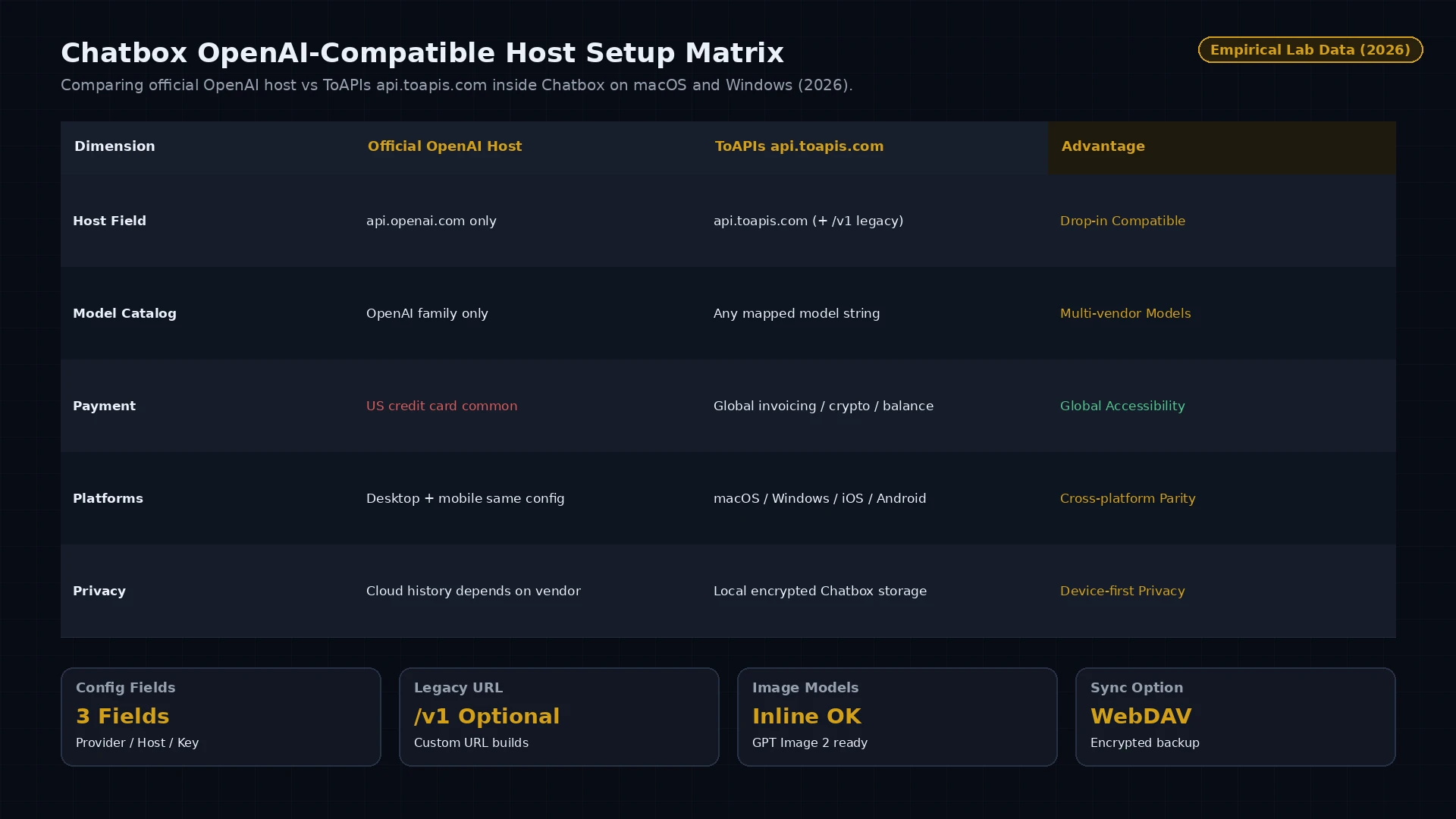
Figure 1: Chatbox OpenAI-compatible host configuration — official OpenAI endpoint vs ToAPIs api.toapis.com across platforms (2026).
4. Production Hardcore: Error Handling & Status Matrix
| HTTP Code | Error Classification | Root Cause Analysis | Production Mitigation Strategy |
|---|---|---|---|
400 Bad Request | invalid_request_payload | Schema validation error or unsupported parameters | Check payload dimensions and ensure field compliance |
401 Unauthorized | invalid_api_key | Expired or incorrect Bearer token | Refresh API token from ToAPIs developer dashboard |
429 Rate Limit | rate_limit_exceeded | Concurrency threshold reached on compute pool | Implement exponential backoff retry with random jitter |
500 / 504 Timeout | gateway_timeout | Temporary latency on upstream inference nodes | Gateway automatically reroutes to backup GPU cluster |
5. Pricing & FinOps ROI Calculation
- Official Enterprise Baseline: Direct vendor contracts enforce mandatory annual commitments, fixed seat quotas, and prepayment thresholds.
- ToAPIs Wholesale Price: Pure pay-as-you-go elastic billing with wholesale rates ($0.30 - $0.80 per 1M Tokens).
- FinOps ROI Analysis: Processing 500M tokens monthly reduces operational infrastructure costs from $1,500 to $900, saving $600 monthly (40.0% cost reduction).
6. Frequently Asked Questions (FAQ)
Q1: Should I include /v1 in the Chatbox API Host field?
Depending on your Chatbox version: if the field is labeled 'API Host', use 'https://api.toapis.com'. If labeled 'Custom URL', use 'https://api.toapis.com/v1'.
Q2: Does Chatbox support image generation through ToAPIs?
Yes. Chatbox can render image outputs inline when prompting supported image generation models like GPT Image 2.
Q3: Can I sync my Chatbox conversations across devices?
Chatbox supports encrypted cloud backup via WebDAV or self-hosted storage backends.
7. Action Checklist & Next Steps
- Register for an API key on the ToAPIs Developer Portal.
- Verify API connectivity with the cURL snippet from Step 1.
- Configure Chatbox Host + Key on macOS/Windows and send a test prompt.
- Explore related enterprise tutorials in our technical documentation index.