Quick Answer

  • Supports prompt-based image generation with multiple aspect ratios.
  • Supports reference_images for stronger style consistency.
  • Official variants expose richer generation controls for production tuning.

Key Parameters

  • model | string | required | gemini-3.1-flash-image-preview | - | Exact image model identifier from ToAPIs.
  • prompt | string | required | - | - | Primary image instruction prompt.
  • size | string | optional | 1:1 | 1:1 | 16:9 | 9:16 | 4:3 | 3:4 | 21:9 | Output aspect ratio.
  • resolution | string | optional | 1K | 1K | 2K | 4K(按模型能力) | Output resolution, varies by model variant.
  • reference_images | file[] | optional | - | max 14 | Reference image array for style/composition control.

Common Errors

  • 400 invalid_request_error: trigger=Missing or invalid request payload fields.; fix=Validate model/prompt/size/resolution fields.; retry=Retry only after fixing payload.
  • 401 authentication_error: trigger=Missing or invalid API key.; fix=Verify Authorization header and API key scope.; retry=Retry after auth fix.
  • 429 rate_limit_exceeded: trigger=Request rate, concurrency, or current quota hits upstream rate limiting.; fix=Apply exponential backoff first, then review request rate, concurrency, and quota usage.; retry=Use 1s/2s/4s backoff with jitter; if it persists, reduce submission pressure.

Model Guide

Gemini 3.1 Flash Image Preview

Model ID: gemini-3-1-flash-image-preview

Vendor: Google (Gemini)Modalities: ImagePrice: $0.0250 /requestUpdated: 2026-05-02

Gemini 3.1 Flash Image Preview is a Google Gemini image generation model supporting text-to-image and reference-guided image creation, aligned to ToAPIs docs.

Model Overview

Quick Answer

  • Supports prompt-based image generation with multiple aspect ratios.
  • Supports reference_images for stronger style consistency.
  • Official variants expose richer generation controls for production tuning.

Gemini 3.1 Flash Image Preview Model Features

Core Section

Core capabilities and practical engineering value

High-quality image generation

Generate high-fidelity images via a unified API.

Reference-guided consistency

Use reference_images to stabilize style and composition.

Production tuning controls

Tune resolution, aspect ratio, and sampling for quality/cost balance.

How to Use Gemini 3.1 Flash Image Preview API

  1. Set Authorization: Bearer <YOUR_API_KEY>.
  2. Call image generation endpoint with model, prompt, and size.
  3. Optionally pass reference_images for stronger consistency.
  4. Poll task status and download result image URLs.
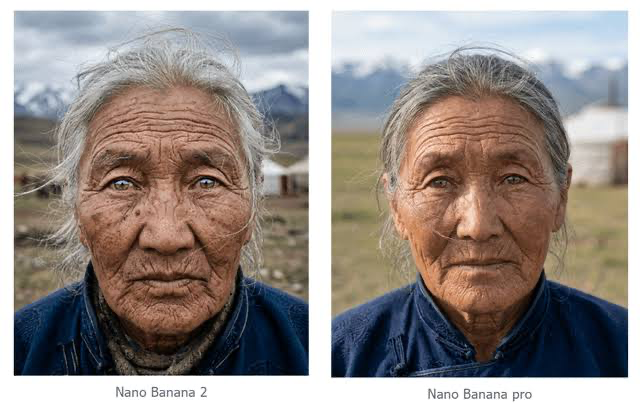
Gemini 3.1 Flash Image Preview sample image 1

When to Use

  • When generating marketing/e-commerce/creative image assets at scale.
  • When using references to stabilize style and iterate prompts quickly.

Runtime Behavior

  • Uses a unified image generation endpoint with task-style responses.
  • Supports reference image inputs with count/size constraints.
  • Resolution and aspect-ratio support vary by Gemini image variant.
Gemini 3.1 Flash Image Preview sample image 2

Key Parameters

ParameterTypeRequiredDefaultRangeDescription
modelstringYesgemini-3.1-flash-image-preview-Exact image model identifier from ToAPIs.
promptstringYes--Primary image instruction prompt.
sizestringNo1:11:1 | 16:9 | 9:16 | 4:3 | 3:4 | 21:9Output aspect ratio.
resolutionstringNo1K1K | 2K | 4K(按模型能力)Output resolution, varies by model variant.
reference_imagesfile[]No-max 14Reference image array for style/composition control.

Common Errors

400 invalid_request_error

Trigger: Missing or invalid request payload fields.

Fix: Validate model/prompt/size/resolution fields.

Retry: Retry only after fixing payload.

401 authentication_error

Trigger: Missing or invalid API key.

Fix: Verify Authorization header and API key scope.

Retry: Retry after auth fix.

429 rate_limit_exceeded

Trigger: Request rate, concurrency, or current quota hits upstream rate limiting.

Fix: Apply exponential backoff first, then review request rate, concurrency, and quota usage.

Retry: Use 1s/2s/4s backoff with jitter; if it persists, reduce submission pressure.

Gemini 3.1 Flash Image Preview sample image 3

FAQ

How should I choose Gemini image variants?

Choose by resolution needs, official vs preview variant, and control parameters; prefer official for production.

Why are reference images not taking effect?

Check reference count/format/size limits and ensure prompt explicitly uses references.

Image or video model error: invalid apitype: -1

This usually means the request was sent to the wrong endpoint. Image and video models typically do not use the chat endpoint. Instead, submit the documented HTTP task request and poll the task status endpoint for results. Check the actual request code, URL, and payload first.

An image or video task failed, but the user was still charged

Ask the user for the task log or screenshot first and check whether input or output token usage appears. If token accounting shows up, the request was likely sent through a chat endpoint instead of the proper media workflow. Image and video models usually run as async HTTP task APIs: submit the task first, then poll by task id according to the relevant docs.

Mode Notes

Text to Image with Gemini 3.1 Flash Image Preview

Generate images directly from prompt instructions.

Mode Parameters

modelpromptsizeresolution

Best Scenarios

  • Product key visuals
  • Ad creatives
  • Concept art

Reference-guided Image with Gemini 3.1 Flash Image Preview

Generate style-consistent images from references.

Mode Parameters

reference_imagespromptsizeresolution

Best Scenarios

  • Brand consistency
  • Character consistency
  • Series posters

Related APIs

今すぐ始めませんか?

無料登録して、エンタープライズ級 AI API ゲートウェイの実力を体験してください

ToAPIs

エンタープライズ向け AI API ゲートウェイ。GPT-5、Claude、Gemini など 50 以上のモデルに 1 つの API でアクセスできます。

会社情報

法務

© 2026 ToAPIs. All rights reserved.

すべてのシステムは正常に稼働中