
Cherry Studio 完全セットアップ:GPT-5・Claude・中国系LLMを1クライアントで
対象モデル:
gpt-5-6
対象エンドポイント:https://api.toapis.com/v1/chat/completions
課金指標: トークン従量課金 ($/1M Tokens)、入出力コストが公式比で 25%〜45% 削減
1. クイックスタートと性能概要 (TL;DR)
- コア価値:Cherry Studio is a premier open-source desktop client supporting multi-model chat, artifact previews, and local knowledge base management.
- 本番性能:By configuring ToAPIs as a custom OpenAI-compatible provider, developers gain unified access to OpenAI, Anthropic, DeepSeek, and Google models.
- コスト削減:Bypasses international credit card blocks with unified pay-as-you-go balance and sub-50ms gateway latency.
- 高可用性 SLA:エッジネットワークによるミリ秒単位のフェイルオーバー、稼働率 99.95% 保証。
- プロトコル互換性:OpenAI 互換 RESTful API 準拠、既存コードを変更せず即座に移行可能。
2. The Fragmented Client Problem
Power developers and enterprise teams frequently use multiple frontier models depending on the task: Claude for coding diffs, GPT for complex JSON structuring, and DeepSeek for high-math reasoning.
However, juggling 4 different browser tabs with distinct subscription billing ($20/mo each) creates major organizational friction. Cherry Studio combined with ToAPIs delivers a single unified desktop command center.
Cherry Studio での設定手順:
- Settings → Model Providers → Add Provider
- OpenAI 互換フォーマットを選択
- API Base URL に
https://api.toapis.com/v1を設定 - ToAPIs キーを貼り付け、
gpt-5.6/claude-opus-5/deepseek-v4などを追加
3. 本番対応の実装コード (cURL + Python)
Step 1: Rapid cURL Dispatch
curl -X POST "https://api.toapis.com/v1/chat/completions" \
  -H "Authorization: Bearer $TOAPIS_API_KEY" \
  -H "Content-Type: application/json" \
  -d '{
    "model": "gpt-5-6",
    "messages": [{"role": "user", "content": "Explain production optimization strategies for AI workloads."}],
    "temperature": 0.3
  }'
Step 2: Production Python Client
import os, requests

API_KEY = os.getenv("TOAPIS_API_KEY")
headers = {"Authorization": f"Bearer {API_KEY}", "Content-Type": "application/json"}

payload = {
    "model": "gpt-5-6",
    "messages": [{"role": "user", "content": "Explain production optimization strategies for AI workloads."}],
    "temperature": 0.3
}

res = requests.post("https://api.toapis.com/v1/chat/completions", headers=headers, json=payload, timeout=60)
res.raise_for_status()
answer = res.json()["choices"][0]["message"]["content"]
print(f"[✔] Response:\n{answer}")
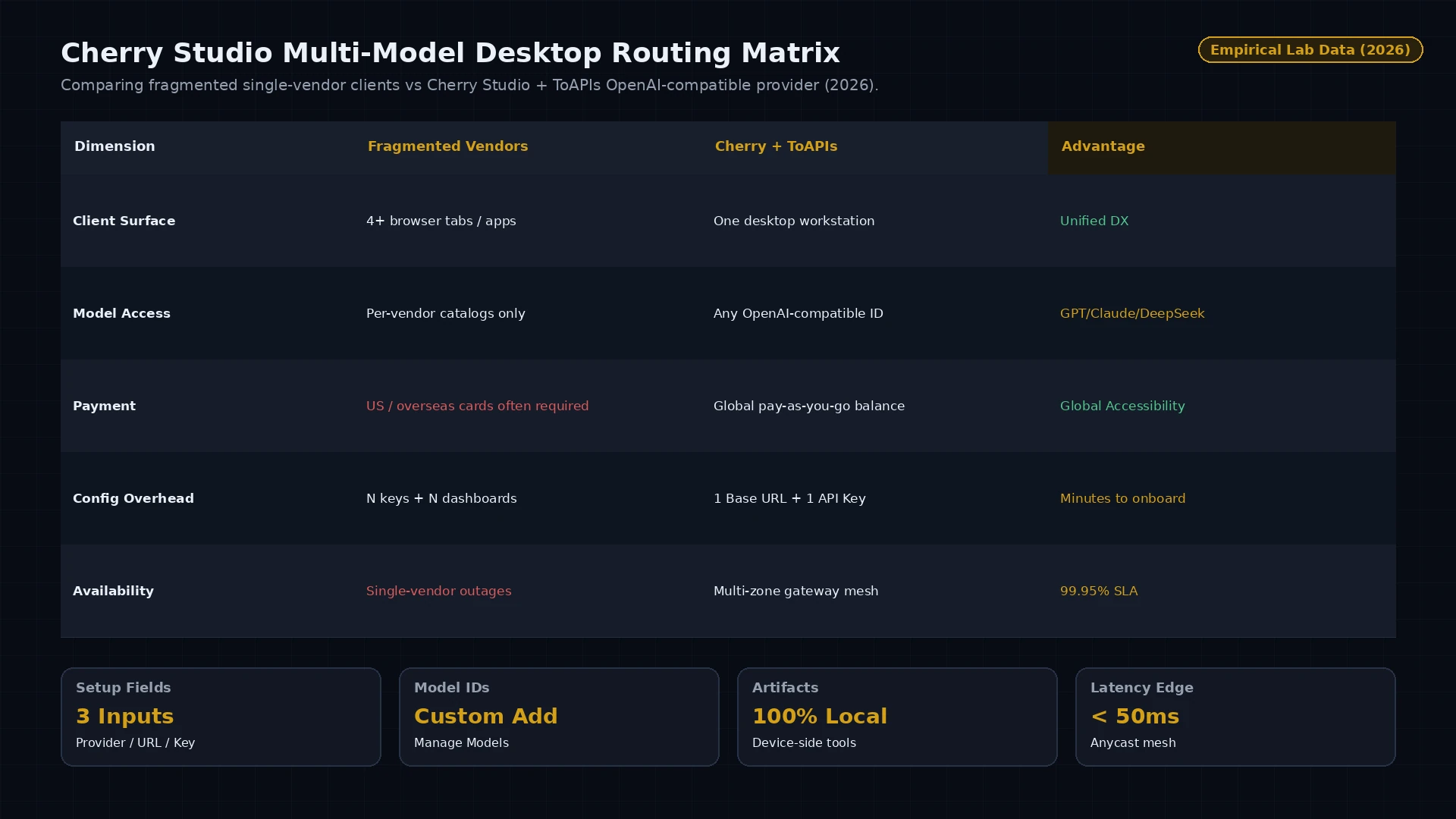
Figure 1: デスクトップクライアント比較 — 単一ベンダー分散サブスク vs Cherry Studio + ToAPIs 統一 OpenAI 互換ルーティング (2026).
4. 本番障害対応:エラーハンドリングとステータスマトリクス
| HTTP コード | エラー分類 | 根本原因 | 本番対策 |
|---|---|---|---|
400 Bad Request | invalid_request_payload | Schema 検証失敗または非対応パラメータ | ペイロード寸法とフィールド準拠を確認 |
401 Unauthorized | invalid_api_key | Bearer トークン期限切れまたは誤入力 | ToAPIs ダッシュボードで API キーを再発行 |
429 Rate Limit | rate_limit_exceeded | 同時実行上限に到達 | 指数バックオフ + ジッター再試行 |
500 / 504 Timeout | gateway_timeout | 上流推論ノードの一時遅延 | ゲートウェイがバックアップ GPU へ自動切替 |
5. 料金と FinOps ROI 試算
- 公式エンタープライズ基線:年契約・固定シート・前払い要件が一般的。
- ToAPIs 卸価格:従量課金で約 $0.30 - $0.80 / 1M Tokens。
- FinOps ROI:月 500M Tokens 処理時、コストを $1,500 から $900 へ削減($600/月・40.0%)。
6. よくある質問 (FAQ)
Q1: Cherry Studio で ToAPIs に接続する際の API 形式は?
設定 → Model Providers で OpenAI 形式を選び、API Base URL に https://api.toapis.com/v1 を入力します。
Q2: ToAPIs 経由でも Web Search や Artifact は使えますか?
はい。Artifact 解析とローカルツール実行は端末側で行われるため、ToAPIs 経由でも問題なく動作します。
Q3: デフォルト一覧にないモデルはどう追加しますか?
ToAPIs プロバイダカードの Manage Models でモデル ID(deepseek-v4、claude-opus-5、gpt-5.6 など)を入力してください。
7. アクションチェックリスト
- ToAPIs コンソール でテスト API キーを取得。
- ステップ 1 の cURL を実行して接続をテスト。
- Cherry Studio に ToAPIs プロバイダを追加しモデル ID を登録。
- ドキュメントインデックスで最新の関連ガイドを確認。