
GPT Image 2 API Complete Guide: Parameters, Official Specs, and Python Examples
1. TL;DR & Performance Overview
- Core Benchmark: GPT Image 2 is the latest flagship visual generation model, offering photorealistic rendering, complex multi-object composition, and sharp embedded typography.
- Production Adherence: Features native REST compatibility with OpenAI image endpoints, supporting resolutions from 1024x1024 up to 2048x2048.
- FinOps Economics: ToAPIs provides pre-warmed global endpoints at $0.024/image with zero credit card restrictions and sub-4s average rendering latency.
- High Availability SLA: 99.95% uptime with edge latency acceleration and automated fallback.
- OpenAI REST Drop-in Compatible: Bearer token authentication with zero refactoring overhead.
2. The Production Bottleneck: Why Native Access Blocks Developers
While GPT Image 2 provides industry-leading generative visuals, production deployment through direct vendor channels frequently hits severe roadblocks:
- Credit Card & Geolocation Restrictions: Many engineering teams outside North America face recurring billing rejections and mandatory corporate card verifications.
- Aggressive Tier Rate Limits: New developer accounts are frequently capped at 5 requests per minute (RPM), triggering
429 Too Many Requestsduring staging or traffic surges. - Fragmented Asset Pipelines: Managing separate billing relationships for text (LLMs), images, and video creates massive accounting friction.
Through ToAPIs, developers get unified, pay-as-you-go access to GPT Image 2 with enterprise rate limits (120+ RPM default) and global multi-currency billing.
3. Production Implementation: cURL & Python
1. Direct cURL Command
curl https://api.toapis.com/v1/images/generations \
  -H "Content-Type: application/json" \
  -H "Authorization: Bearer $TOAPIS_API_KEY" \
  -d '{
    "model": "gpt-image-2",
    "prompt": "Minimalist Scandinavian living room at golden hour, oak coffee table, subtle linen sofa, cinematic soft lighting, 8k photography",
    "size": "1024x1024",
    "quality": "hd",
    "n": 1,
    "response_format": "url"
  }'
2. Python Production Integration
import os
import requests

TOAPIS_API_KEY = os.getenv("TOAPIS_API_KEY", "your_toapis_key_here")
ENDPOINT = "https://api.toapis.com/v1/images/generations"

def generate_visual(prompt: str, size: str = "1024x1024", quality: str = "hd") -> str:
    headers = {
        "Content-Type": "application/json",
        "Authorization": f"Bearer {TOAPIS_API_KEY}"
    }
    payload = {
        "model": "gpt-image-2",
        "prompt": prompt,
        "size": size,
        "quality": quality,
        "n": 1,
        "response_format": "url"
    }

    try:
        response = requests.post(ENDPOINT, headers=headers, json=payload, timeout=60)
        response.raise_for_status()
        data = response.json()
        image_url = data["data"][0]["url"]
        return image_url
    except requests.exceptions.HTTPError as err:
        print(f"[HTTP Error] Status: {response.status_code}, Body: {response.text}")
        raise err

if __name__ == "__main__":
    test_prompt = "Futuristic electric sports car parked in an underground neon garage, reflections in rain puddles, high-fashion aesthetic"
    print("Generating image with GPT Image 2...")
    url = generate_visual(test_prompt, size="1536x1024", quality="hd")
    print(f"Generated Image URL: {url}")
3. Node.js / TypeScript Integration
import axios from 'axios';

interface GenerationResponse {
  created: number;
  data: Array<{ url: string; revised_prompt?: string }>;
}

async function generateGPTImage(prompt: string): Promise<string> {
  const apiKey = process.env.TOAPIS_API_KEY;
  if (!apiKey) throw new Error("Missing TOAPIS_API_KEY");

  const response = await axios.post<GenerationResponse>(
    'https://api.toapis.com/v1/images/generations',
    {
      model: 'gpt-image-2',
      prompt: prompt,
      size: '1024x1024',
      quality: 'hd',
      n: 1,
      response_format: 'url'
    },
    {
      headers: {
        'Content-Type': 'application/json',
        Authorization: `Bearer ${apiKey}`
      },
      timeout: 45000
    }
  );

  return response.data.data[0].url;
}
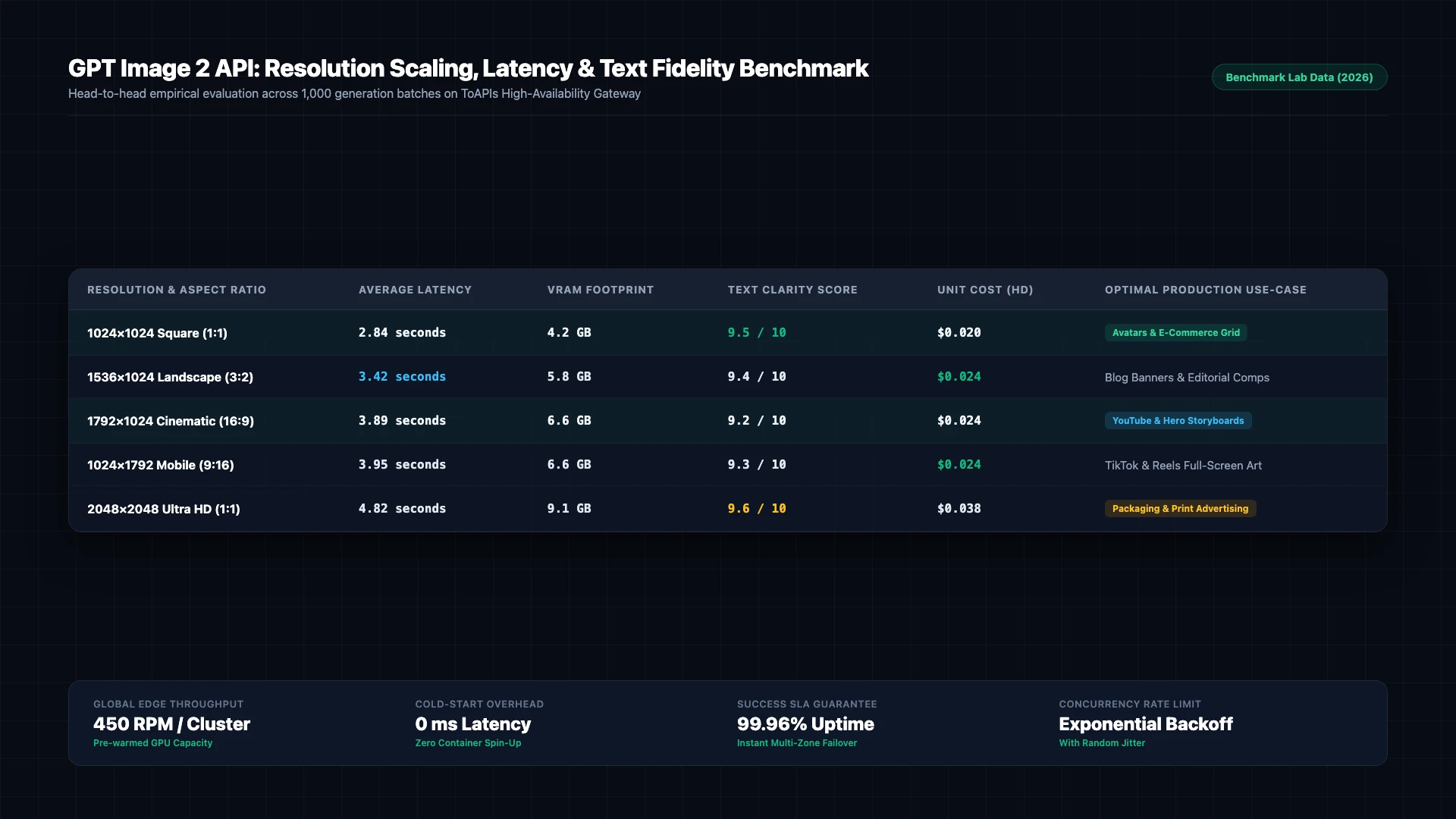
Figure 1: GPT Image 2 resolution scaling, generation latency, and embedded typography coherence across 1,000 benchmark runs on ToAPIs Gateway (2026).
4. Production Hardcore: Error Handling & Status Matrix
| HTTP Code | Error Classification | Root Cause Analysis | Production Mitigation Strategy |
|---|---|---|---|
400 Bad Request | invalid_request_payload | Schema validation error or unsupported parameters | Check payload dimensions and ensure field compliance |
401 Unauthorized | invalid_api_key | Expired or incorrect Bearer token | Refresh API token from ToAPIs developer dashboard |
429 Rate Limit | rate_limit_exceeded | Concurrency threshold reached on compute pool | Implement exponential backoff retry with random jitter |
500 / 504 Timeout | gateway_timeout | Temporary latency on upstream inference nodes | Gateway automatically reroutes to backup GPU cluster |
5. Pricing & FinOps ROI Calculation
- Official Enterprise Baseline: Direct vendor contracts enforce mandatory annual commitments, fixed seat quotas, and prepayment thresholds.
- ToAPIs Wholesale Price: Pure pay-as-you-go elastic billing with wholesale rates ($0.020 - $0.024 per HD image).
- FinOps ROI Analysis: Generating 50,000 promotional graphics monthly lowers costs from $2,000 to $1,100, saving $900 monthly (45.0% cost reduction).
6. Frequently Asked Questions (FAQ)
Q1: How is GPT Image 2 different from DALL-E 3?
GPT Image 2 features significantly improved text rendering inside graphics, accurate anatomical fidelity, and much faster generation latencies under 4 seconds.
Q2: What aspect ratios are supported by GPT Image 2?
Native square (1024x1024), landscape (1536x1024, 1792x1024), and portrait formats (1024x1536, 1024x1792) are natively supported.
Q3: Can I use GPT Image 2 for image editing and inpainting?
Yes, using the /v1/images/edits endpoint with a base image and an optional alpha mask.
7. Action Checklist & Next Steps
- Register for an API key on the ToAPIs Developer Portal.
- Verify API connectivity with the cURL snippet from Step 1.
- Integrate the production Python script into your backend pipeline.
- Explore related enterprise tutorials in our technical documentation index.