
Cherry Studio 설정 완전 가이드: GPT-5·Claude·중국 LLM을 한 클라이언트에서
타겟 모델:
gpt-5-6
타겟 엔드포인트:https://api.toapis.com/v1/chat/completions
과금 지표: 토큰 종량제 과금 ($/1M Tokens), 입력/출력 비용 공식 대비 25% ~ 45% 절감
1. 핵심 요약 및 엔지니어링 가이드 (TL;DR)
- 핵심 강점:Cherry Studio is a premier open-source desktop client supporting multi-model chat, artifact previews, and local knowledge base management.
- 프로덕션 성능:By configuring ToAPIs as a custom OpenAI-compatible provider, developers gain unified access to OpenAI, Anthropic, DeepSeek, and Google models.
- 비용 절감:Bypasses international credit card blocks with unified pay-as-you-go balance and sub-50ms gateway latency.
- 고가용성 SLA:99.95% 가동률 SLA, 엣지 가속을 통한 밀리초 단위 자동 장애 조치.
- 프로토콜 호환:OpenAI RESTful 규격 완벽 호환, 기존 코드 리팩토링 없이 전환 가능.
2. The Fragmented Client Problem
Power developers and enterprise teams frequently use multiple frontier models depending on the task: Claude for coding diffs, GPT for complex JSON structuring, and DeepSeek for high-math reasoning.
However, juggling 4 different browser tabs with distinct subscription billing ($20/mo each) creates major organizational friction. Cherry Studio combined with ToAPIs delivers a single unified desktop command center.
Cherry Studio 빠른 설정:
- Settings → Model Providers → Add Provider
- OpenAI 호환 형식 선택
- API Base URL에
https://api.toapis.com/v1입력 - ToAPIs 키를 붙이고
gpt-5.6,claude-opus-5,deepseek-v4등 추가
3. 실전 연동 코드 (cURL + Python)
Step 1: Rapid cURL Dispatch
curl -X POST "https://api.toapis.com/v1/chat/completions" \
  -H "Authorization: Bearer $TOAPIS_API_KEY" \
  -H "Content-Type: application/json" \
  -d '{
    "model": "gpt-5-6",
    "messages": [{"role": "user", "content": "Explain production optimization strategies for AI workloads."}],
    "temperature": 0.3
  }'
Step 2: Production Python Client
import os, requests

API_KEY = os.getenv("TOAPIS_API_KEY")
headers = {"Authorization": f"Bearer {API_KEY}", "Content-Type": "application/json"}

payload = {
    "model": "gpt-5-6",
    "messages": [{"role": "user", "content": "Explain production optimization strategies for AI workloads."}],
    "temperature": 0.3
}

res = requests.post("https://api.toapis.com/v1/chat/completions", headers=headers, json=payload, timeout=60)
res.raise_for_status()
answer = res.json()["choices"][0]["message"]["content"]
print(f"[✔] Response:\n{answer}")
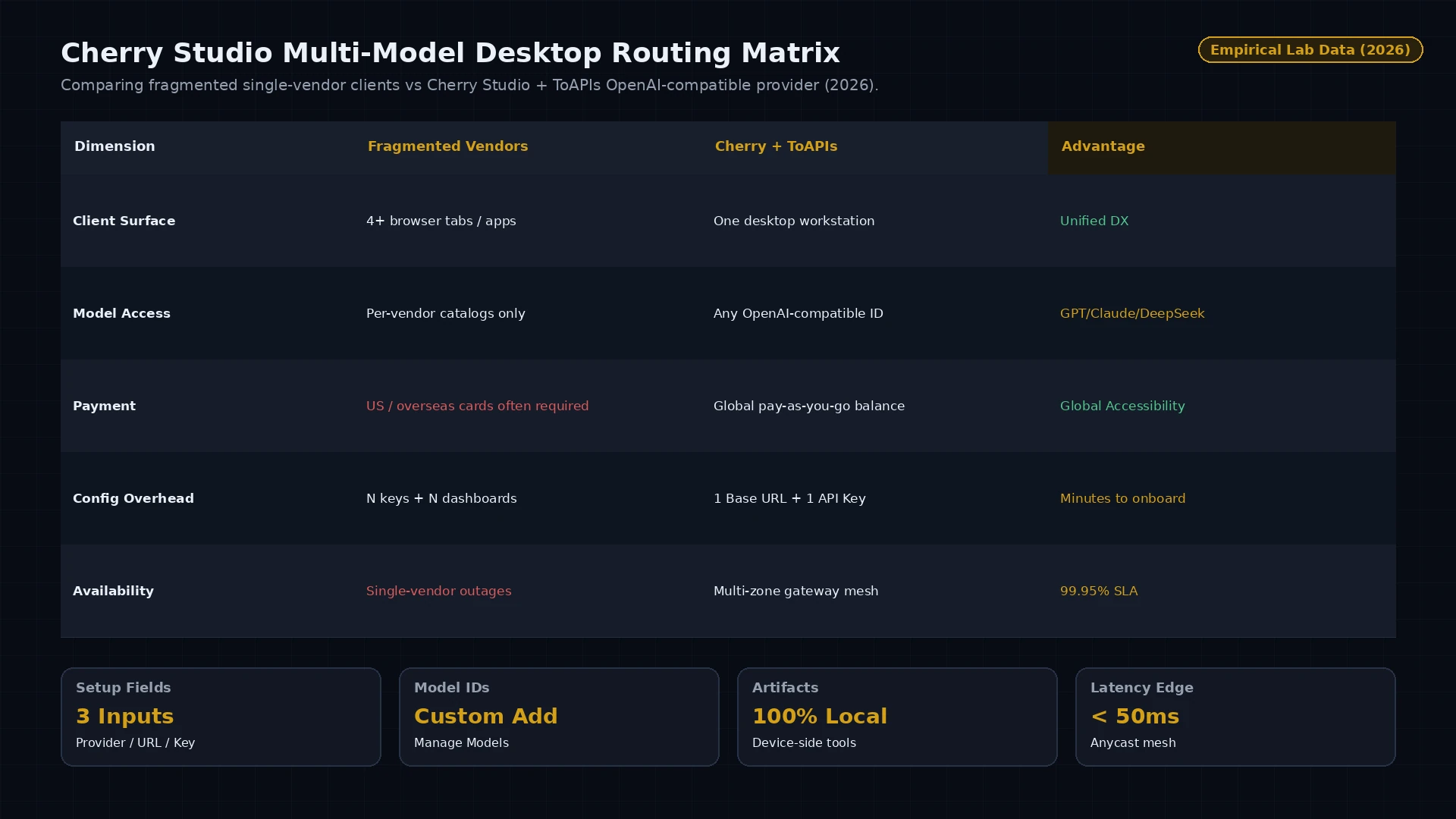
그림 1: 데스크톱 클라이언트 비교 — 단일 벤더 구독 파편화 vs Cherry Studio + ToAPIs 통합 OpenAI 호환 라우팅 (2026).
4. 프로덕션 장애 대응: 오류 처리 및 상태 코드 매트릭스
| HTTP 코드 | 오류 분류 | 근본 원인 | 프로덕션 대응 |
|---|---|---|---|
400 Bad Request | invalid_request_payload | Schema 검증 실패 또는 미지원 파라미터 | 페이로드 필드와 문서 요구사항 확인 |
401 Unauthorized | invalid_api_key | Bearer 토큰 만료 또는 오입력 | ToAPIs 대시보드에서 API 키 재발급 |
429 Rate Limit | rate_limit_exceeded | 동시성/RPM 한도 도달 | 지수 백오프 + 지터 재시도 |
500 / 504 Timeout | gateway_timeout | 업스트림 추론 노드 일시 지연 | 게이트웨이가 백업 GPU로 자동 전환 |
5. 요금과 FinOps ROI 계산
- 공식 엔터프라이즈 기준: 연간 계약, 고정 시트, 선결제 요구가 일반적입니다.
- ToAPIs 도매가: 종량 과금 약 $0.30 - $0.80 / 1M Tokens.
- FinOps ROI: 월 500M Tokens 처리 시 비용을 $1,500에서 $900으로 절감($600/월, 40.0%).
6. 자주 묻는 질문 (FAQ)
Q1: Cherry Studio에서 ToAPIs 연동 시 어떤 API 형식을 선택해야 하나요?
설정 → Model Providers에서 OpenAI 형식을 선택하고 API Base URL에 https://api.toapis.com/v1 을 입력하세요.
Q2: ToAPIs 경유 시 Web Search와 Artifact도 사용할 수 있나요?
가능합니다. Artifact 파싱과 로컬 도구 실행은 기기에서 처리되므로 ToAPIs 라우팅과 충돌하지 않습니다.
Q3: 기본 목록에 없는 모델은 어떻게 추가하나요?
ToAPIs Provider 카드의 Manage Models에서 모델 ID(deepseek-v4, claude-opus-5, gpt-5.6 등)를 입력하면 됩니다.
7. 실행 체크리스트
- ToAPIs 콘솔에서 테스트 API 키 발급.
- 단계 1의 cURL로 연동 테스트 완료.
- Cherry Studio에 ToAPIs Provider를 추가하고 모델 ID 등록.
- 기술 문서 색인에서 관련 모델 가이드 확인.